


Skip to content
info@stockrest.com
  1. Home
  2. Features

Everything that happens in your restaurant, connected

Each area works with its own screens, but they all use the same data: what is bought, what is in stock, what is ordered, what is cooked and what is charged.
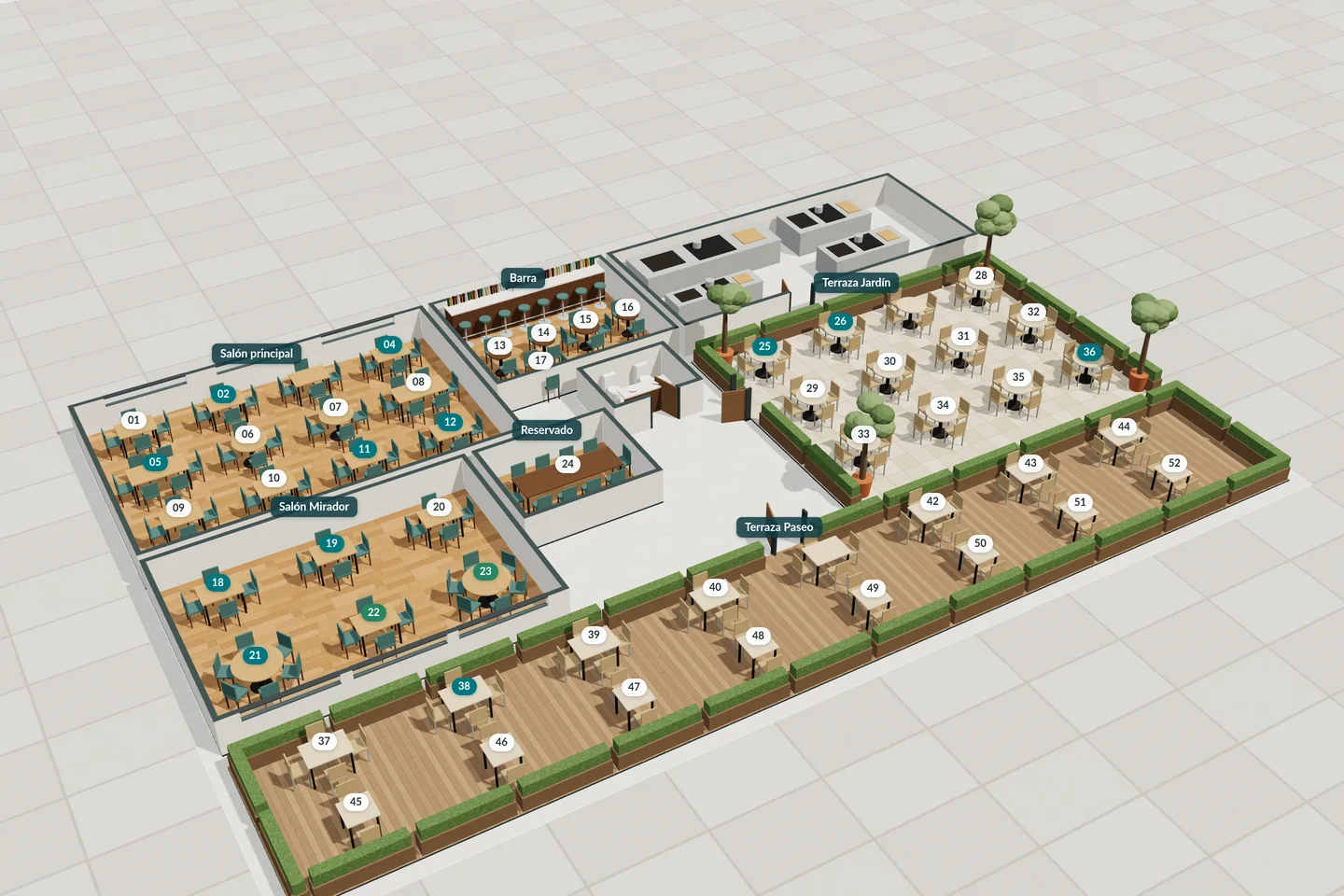
3D view of the StockRest floor plan: dining rooms, bar, kitchen, olive trees and terraces with their tables and chairs.
Floor plan2D · 3D

Dining room and tables

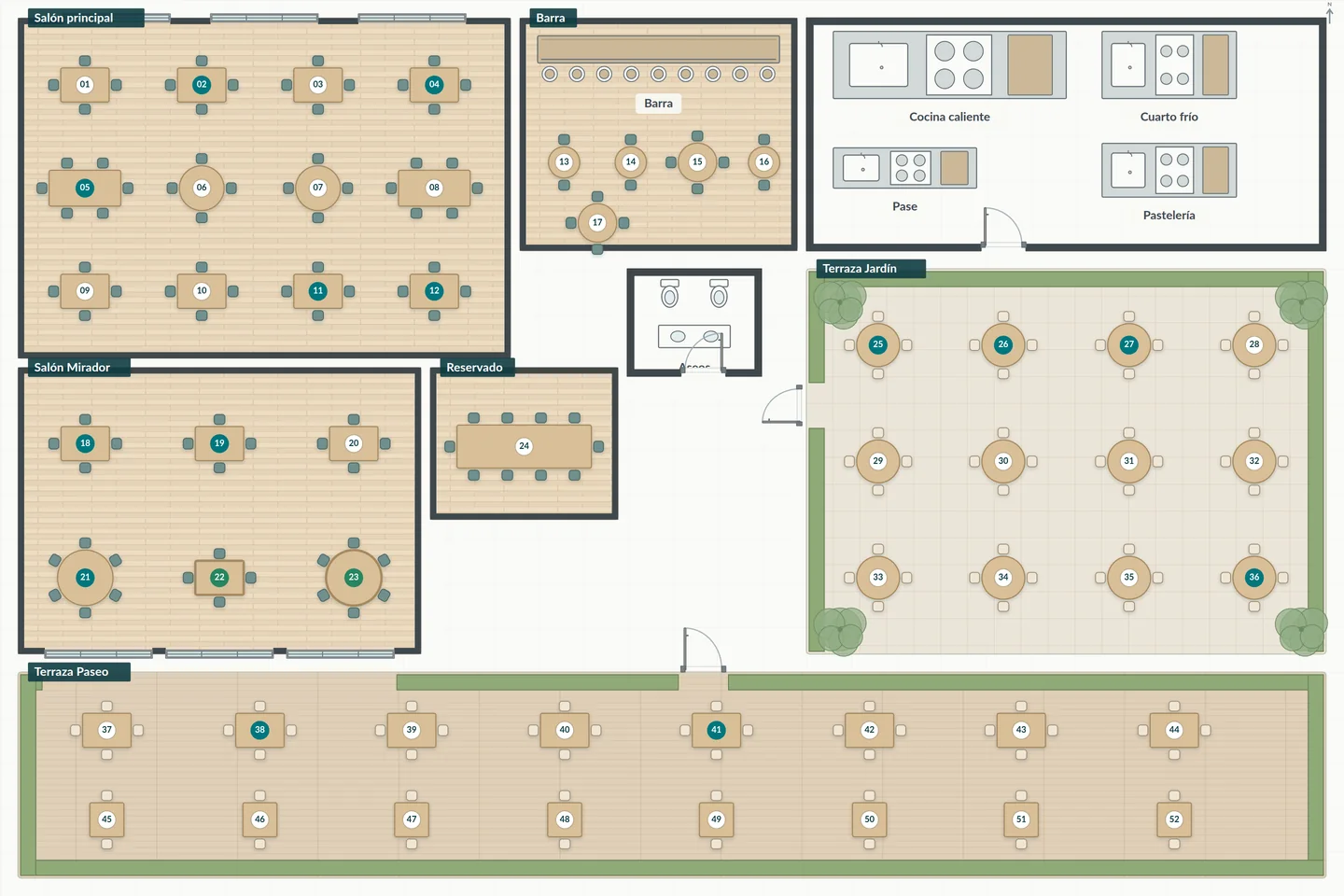
The floor plan shows the venue from above, with its dining rooms and terraces, and every device sees the same status.

  • Tables, seats, bars, doors and landmarks drawn to fit your venue, in 2D and 3D views.
  • Occupancy and service progress shown separately: an occupied table is not the same as a table with dishes pending.
  • Join tables for a group, split them afterwards and move diners or dishes between tables.
  • Cleaning and blocked statuses, assigned waiter and table bookings.
  • Each dish goes to a seat, is shared or is left to be assigned.
Floor planDining room and terrace
StockRest 2D floor plan: two dining rooms, a private room, bar, kitchen, toilets and two terraces with their tables and chairs; each table number takes the colour of its status.
2D view Enlarge

Occupancy and service progress are shown separately.

Orders and availability

Front of house sees what it can offer and how many portions are left. When the order is sent, StockRest validates all of it and reserves its ingredients in a single operation.

  • Each dish shows whether it is available, running low, sold out, blocked by the kitchen, waiting on a prior prep or lacking enough information.
  • Dishes that share ingredients do not add up their portions as if they were independent.
  • If the order cannot be accepted in full, the affected lines are flagged so they can be changed.
  • Dining room, bar and takeaway channels, with a target time.
  • Cancelling before cooking releases the reservation; after that, what happens to the prepared food is recorded.

Kitchen and the pass

The kitchen screen organises work by station and suggests the order of tasks. The head chef stays in control.

  • It respects courses on hold, dependencies between preparations and tasks already started.
  • It works out when each course goes out from the recipe times and the capacity of stations and equipment.
  • It schedules short preparations so they finish together with the rest of the course.
  • It groups identical dishes with the same variants and the same allergen protocol into cooking batches.
  • The head chef can bring forward, hold or move a task to another station, and the reason stays visible.
  • It records the actual times for sending, starting, ready and served.

Recipes and recipe costing

Each recipe has versions, yield, normal waste, steps, station, equipment, times, reviewed allergens and cost per portion.

  • The recipe costing shows the quantity, cost and share of each component, including seasonings and sides.
  • Batch preps, such as sauces or stocks, use up their ingredients when they are made and create their own stock.
  • Changing a brand or an ingredient flags the recipe's allergens for review.
  • Authorised variants: size, doneness, extras and substitutions.
  • Orders already accepted keep the recipe version they were ordered with.
Try the recipe costing simulator

Inventory and batches

Stock is held in batches, with location, cost, delivery date and expiry date. Every change is recorded as a movement.

  • What is available is the usable stock minus what is reserved by accepted orders.
  • What expires first is used first; expired or blocked batches no longer count.
  • Waste with cause, quantity and cost, and stock counts that reconcile what moved while the count was under way.
  • A batch can be traced to the preps and orders that used it.
  • Record of the food the customer takes away and the container used.

Purchasing and suppliers

Purchasing needs are worked out from stock, reservations, minimums, planned preps and orders still to arrive.

  • It compares references by the price of the usable quantity: drained weight, full packs, delivery charges and minimum order.
  • Each price keeps its date and source; an old figure is flagged as such.
  • The person in charge confirms orders, and sending them to the supplier is always an explicit action.
  • Each delivery records shortages, substitutions and rejections; only what is accepted goes into inventory.
  • Delivery notes, receipts and purchase invoices attached to the order and the delivery.

POS and till

Open bills, added items and pre-bill. The bill has its own status: it can be partly paid while there are still dishes to serve.

  • Splitting by dish, in equal parts or by amount, without losing a cent.
  • Partial and mixed payments: cash with change, card on your card terminal and other methods.
  • Discounts and complimentary items with permission and a reason, and documented refunds.
  • Till opening, movements and closing, with expected cash against counted cash.
  • Printing of receipts and documents, with reprints identified.
  • Sales export for your accountant.

VERI*FACTU invoicing

Simplified, full and corrective invoices with their invoicing record, chained hash and QR code.

  • The record is generated in the same operation that issues the document.
  • Submission to the AEAT (Spanish Tax Agency) with the restaurant's certificate and retry control.
  • Issued documents are never overwritten; corrections remain linked to the original.
See how it works

Customers

The customer profile is optional. It helps remember preferences, link visits and understand habits without complicating service.

  • Typo-tolerant search and a visit history with each visit's booking, table, order and bill.
  • Stated preferences kept separate from observed habits.
  • Average spend, frequency and repeat visits, with their definition and the share of identified visits.
  • The spend of a group table is not attributed to the person who made the booking.
  • Contact details, financial data and exports with their own permissions.

Reports

Profitability, usage, waste, service times, till and areas, with the period, the capacity and the missing data in plain view.

  • Margin per dish and popularity against contribution.
  • Theoretical usage against physical stock counts.
  • Waste by cause and its share of the cost.
  • Waiting times, preparation times and time spent at the pass.
  • Occupancy, turnover, average spend and waiting time per table, area and shift.
  • Till discrepancies for each session.

Team, security and continuity

People, their permissions and the restaurant's data are also managed from StockRest.

People and roles

Roles with permissions per action, shifts, and the same person at several venues with different roles.

Sessions and devices

Active sessions in view, inactivity lock and devices that can be revoked.

Activity log

Who changed recipes, stock, orders, priorities or the till, and when.

Backups

Backups that can be verified, tested and restored when needed.

Training mode

A temporary copy for practising without touching the real service or invoicing.

Phone, tablet and computer

A responsive web app: each person uses whichever device suits their station best.

See security and data

Request a StockRest walkthrough

Tell us how your restaurant works and we will show you how the dining room, kitchen, purchasing and till fit together.